KQ MiniSynth – Miscellaneous modules
KQ MiniSynth – All modules
I/O Panel
< |
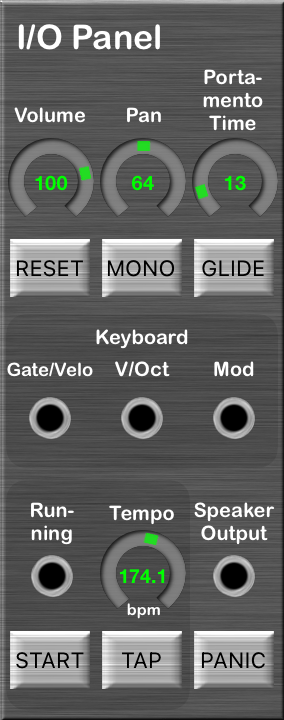
This is a fixed panel for Input/Output.
Connectors / Parameters
-
Volume
Change Volume.
-
Pan
Change Pan position.
64 — Center.
-
Portamento Time
Change time during gliding notes.
0 — Do not glide.
100 — 1 seconds.
127 — 20 seconds.
-
RESET button
Reset all controllers.
-
MONO button
Toggle Monophonic and Polyphonic.
-
GLIDE button
Enable always gliding.
-
Gate/Velo
This outputs the strength with which you press a key.
The range is -1 ~ 1:
0 ~ 1 if keys are pressed, -1 if not.
-
V/Oct
This outputs the pitch of the key.
-
Mod
This outputs the value of the modulation wheel.
The range is -1 ~ 1.
-
Start/Stop
This outputs the state of the button “START”/”STOP”.
-
Tempo
Set how fast it beats.
Also you can set Tempo with tapping the button “TAP”.
-
Speaker Output
The synthesizer outputs this input as sound.
-
PANIC button
Silence if in panic.
|
KQ MiniSynth – All modules
Custom Controller
 |
Output MIDI Controller Value.
Use this module if you control the Synth with MIDI signal.
Also it is able to change the value.
Connectors/Parameters
-
Ctrl No
MIDI Control Number.
LSB controllers are valid though those are not selectable.
-
Value
A value of the controller.
-
FINE button
If enabled, the value range is 0 ~ 127.
If disabled, the range is -8192 ~ 8191.
-
Value Out
Output the value.
This outputs -1.0 if the fine value is -8192,
0 if the value is 0,
1.0 if the value is 8191, or so on.
|
KQ MiniSynth – All modules
Const Value
 |
This outputs a constant value.
Connectors / Parameters
|
KQ MiniSynth – All modules
Oscilloscope (Version 3.0)
 |
This module displays the input.
Connectors / Parameters
|
KQ MiniSynth – All modules
Dummy Panel
 |
This is a blank panel.
|
KQ MiniSynth – All modules






Recent Comments