KQ Tixie Manual
KQ Tixie Manual
FAQ
The volume has become quieter
KQ Tixie provides several volume-related parameters. Please check all of the following:
- Master Volume
The Vol control at the top-left corner of the Layers screen. - Layer Volume 1
The Vol control for L1, L2, etc. on the Layers screen. - Foot Control
The Ctrl (F) setting for L1, L2, etc. on the Layers screen. - Play Volume
The Volume control on the Play screen. - Layer Volume 2
The Volume parameter on the Edit screen.
This is also the lower Vol control in the pop-up panel that appears when you tap the … button at the far right of L1, L2, etc. on the Layers screen. Note: Due to a bug in versions 1.1 through 1.1.5, this parameter does not function in those versions.
How do I import patches?
You can import patches or performances from Import Patches or Import Performances in the Settings screen.
Importing received MIDI bulk data
If you want to import bulk data received via MIDI, the import screen displays the number of received patches or performances.
Tap Import from Received, select the destination folder, and the data will be imported.
Note: Versions 1.1.5 and earlier contain a bug that causes patches to be overwritten when importing performance data received via MIDI. If you are using version 1.1.5 or earlier, do not import performance data through MIDI. Importing performance data from files works correctly.
Importing from files
To import from SYX or MID files, tap Import Files or Import Folder.
First, select the destination folder. Then choose the files or folder you want to import, and tap the checkmark button in the upper-right corner to start the import.
Patch import fails
Please make sure the patch you are trying to import is intended for a supported synthesizer.
Supported import formats are limited to the models listed below. Patches from the DX7, Reface DX, and Montage series cannot be imported.
- Yamaha FB-01
- Yamaha DX21, DX27, DX100, DX11, TX81Z, WT11, V50
- Yamaha EOS YS200, YS100, B200, DS55, TQ5
- KORG DS-8, 707
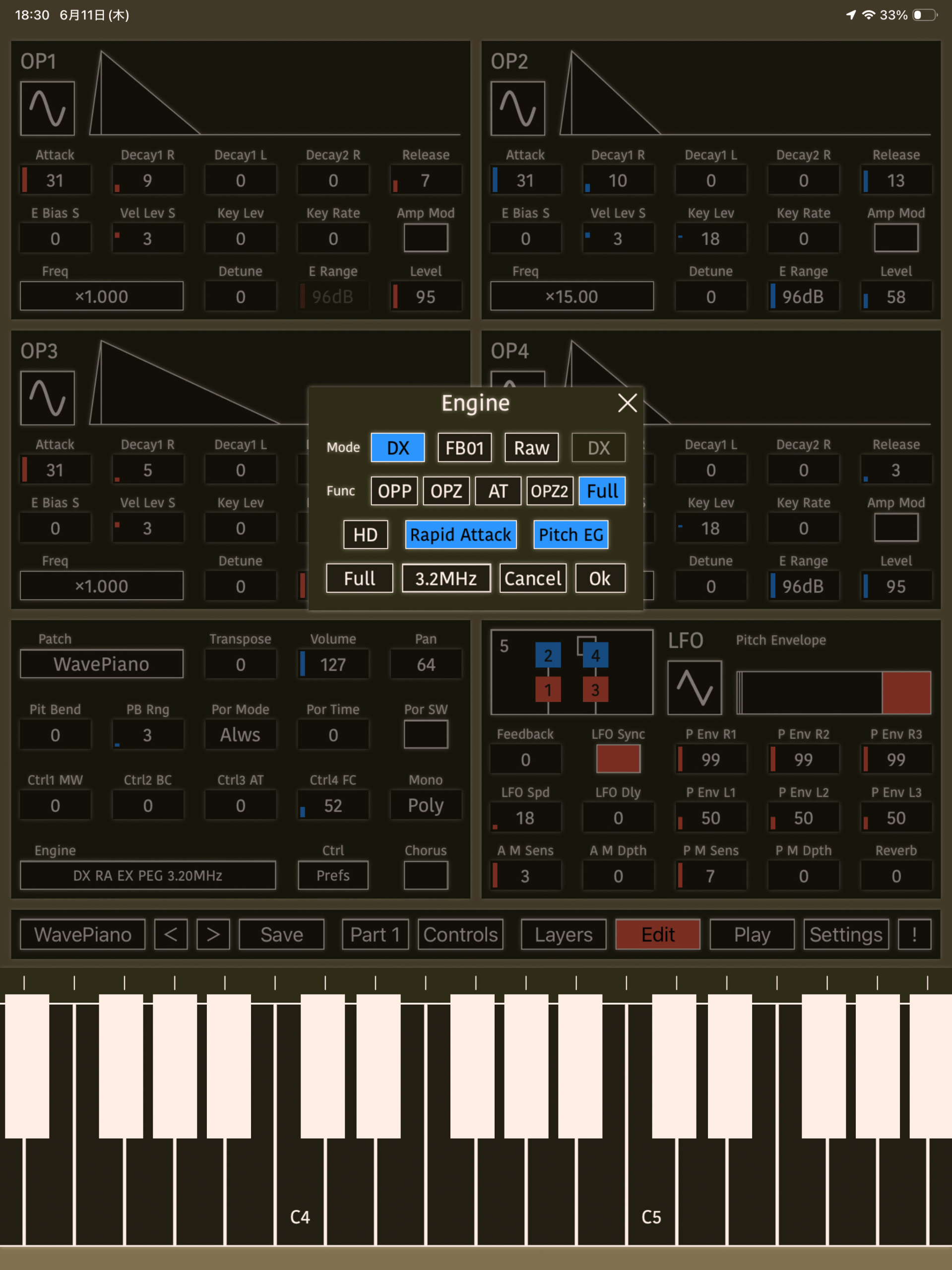
About its Engine
KQ Tixie can emulate various synthesizers by switching between different engine modes.
Mode
DX
Uses the same parameters as Yamaha DX-series synthesizers such as the DX21.
FB01
Uses the same parameters as the Yamaha FB-01.
Raw
A mode that allows you to specify the internally calculated values almost directly.
In Raw mode, you can choose one of three parameter tables:
- DX
- FB
- DS8
Func
Restricts functions that are unavailable on specific DX-series models.
HD, Rapid Attack
HD is KQ Tixie’s proprietary 24-bit FM engine.
Rapid Attack provides behavior closer to the OPZ FM chip.
Machine Preset
Select a synthesizer model to load the appropriate settings.
- DX21
- DX100
- TX81Z
- DX11
- TQ5
- WT11
- V50
- FB-01
- DS-8
- Full
Chip Frequency
Specifies the operating frequency of the emulated chip.
3.2 MHz
Used in EOS-series models (YS200, YS100, TQ5, B200, DS55).
3.58 MHz
Used in DX-series models (DX21, DX27, DX100, TX81Z, DX11(V2)).
4.0 MHz
Used in the FB-01.
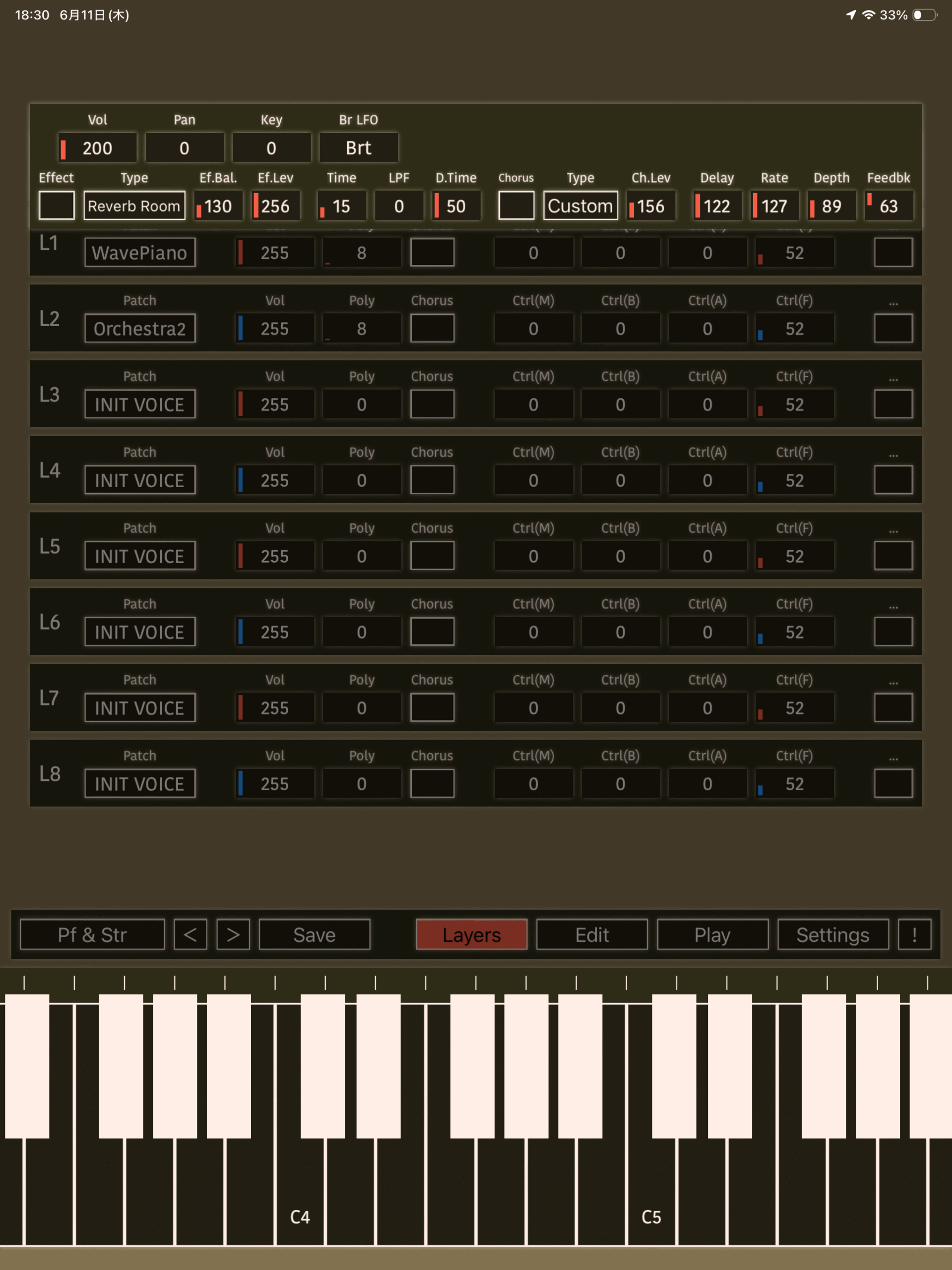
Master Controls
The following parameters are available.
Vol
Master volume.
Pan
Stereo panning.
Key
Master transpose. Shifts pitch in semitone steps.
Br LFO
Specifies the Breath LFO mode found on the WT11.
Brt
Normal mode. Breath LFO is enabled, and pitch bend functions normally.
PB
Breath LFO becomes active when the pitch bend wheel is moved above its center position. Pitch bend messages do not alter pitch.
Off
Breath LFO is disabled. Pitch bend functions normally.
Effect
Enables the effect processor. The layer’s Effect setting must also be enabled.
Type
Selects the effect type.
- Thru
- Reverb Hall
- Reverb Room
- Reverb Plate
- Delay
- Delay L/R
- Stereo Echo
- Dist. + Reverb
- Dist. + Echo
- Gate Rev.
- Reverse Gate
- Early Ref.
- Tone Control 1
- Delay & Reverb
- Delay L/R & Rev.
- Dist. & Delay
- Church
- Club
- Stage
- Bath Room
- Metal
- Tunnel
- Doubler 1
- Doubler 2
- Feedback Gate
- Feedback Reverse
- Feedback E/R
- Delay & Tone 1
- Dly L/R & Tone 1
- Tone Control 2
- Delay & Tone 2
- Dly L/R & Tone 2
- Distortion
Ef.Bal.
Balance between effected and dry signals.
Ef.Lev
Effect output level.
Param 1, Param 2, Param 3
Effect-specific parameters.
Chorus
Enables the chorus/delay effect. Chorus must also be enabled in the Global settings.
Type
Chorus/delay effect preset.
- Chorus 1
- Chorus 2
- Chorus 3
- Chorus 4
- Flanger
- Doubler
- Shrt Dly
- Long Dly
Ch.Lev
Chorus/delay effect level.
Delay
Delay time.
Rate
LFO modulation rate.
Depth
LFO modulation depth.
Feedbk
Delay feedback amount. Negative values are also supported.
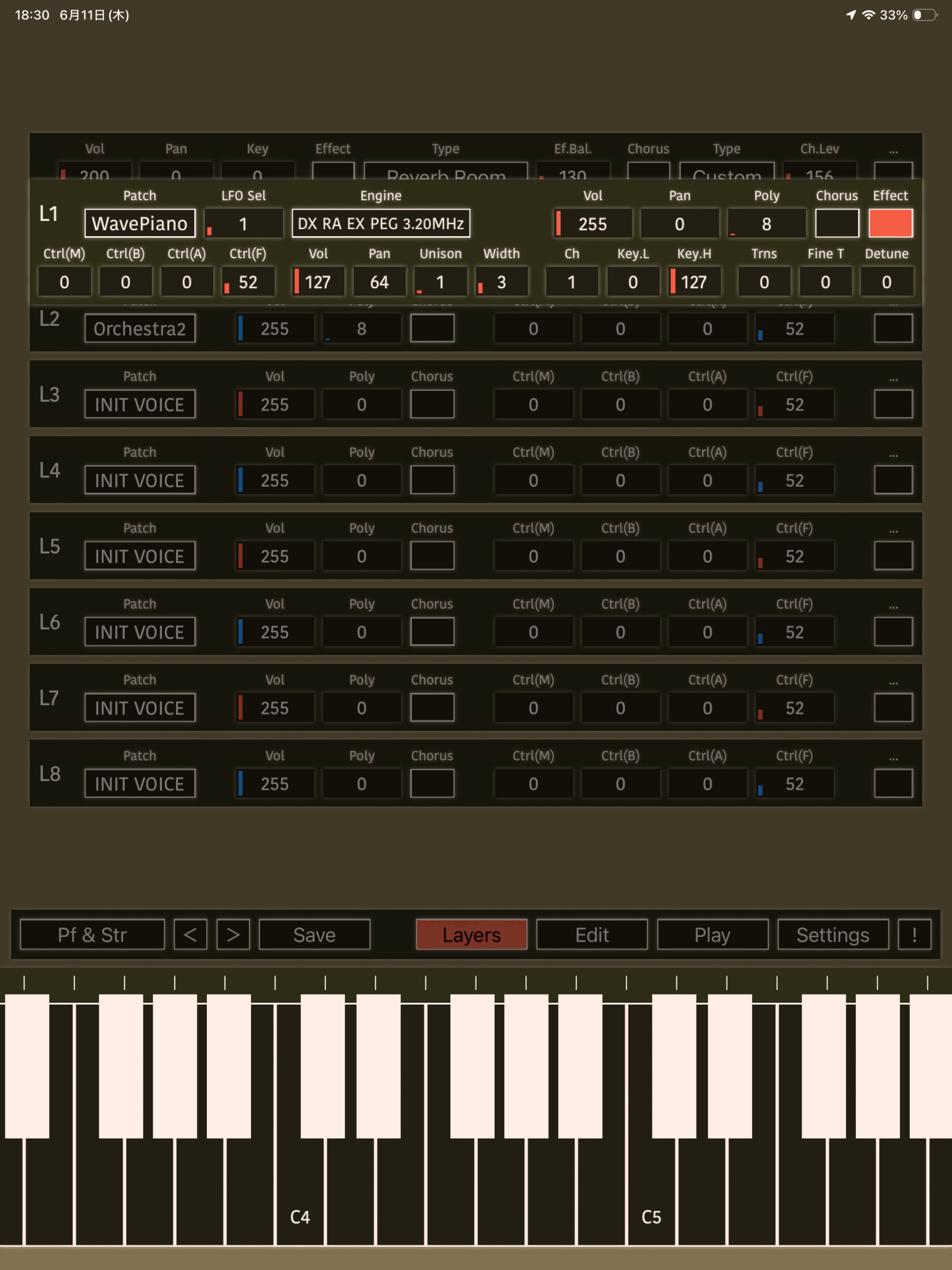
Layers
KQ Tixie can stack up to eight layers simultaneously.
Each layer provides the following parameters.
Voice
Loads a voice.
LFO Sel
KQ Tixie provides two shared LFOs. Select whether the layer uses LFO 1, LFO 2, an independent pitch-only LFO, or no LFO.
When selecting 1 or 2, the settings from the lowest-numbered layer using that LFO are applied.
Engine
Selects the synthesis engine.
Vol
Layer volume.
Pan
Layer panning.
Poly
Maximum polyphony.
Chorus
Enables the chorus/delay effect. Chorus must also be enabled in the Global settings.
Effect
Enables the effect processor. Effect must also be enabled in the Global settings.
Ctrl(M), Ctrl(B), Ctrl(A), Ctrl(F)
Controller assignments. See the Controller section.
Vol
Additional volume adjustment.
Pan
Additional pan adjustment.
Unison
Stacks multiple voices for a thicker sound.
Width
Detune amount used by Unison.
Ch
MIDI channel.
Key.L, Key.H
Keyboard range that responds to incoming notes.
Trns
Transpose in semitone steps.
Fine T
Fine tuning. A value of 64 equals one semitone.
Detune
Applies subtle pitch variation. This is not a simple pitch offset.
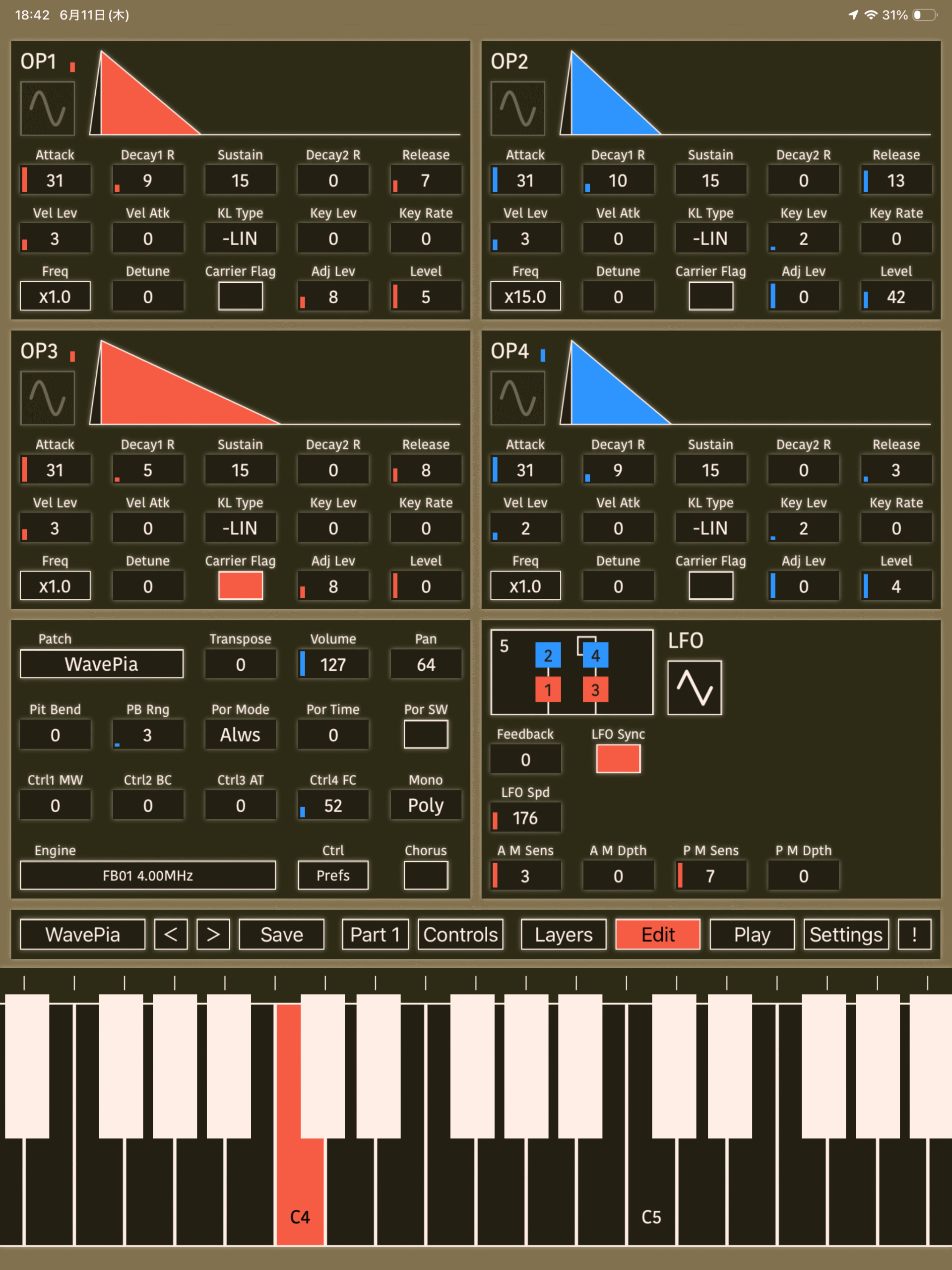
Edit Screen
Three editor layouts are available depending on the selected engine.
If Use Single Mode for Edit is enabled in Settings, the editor opens in Single Mode.
In Single Mode, some Layer settings are ignored. You can also return to the Play screen while remaining in Single Mode.
DX Mode
Parameters conform to Yamaha’s 4-operator DX-series synthesizers. Refer to Yamaha documentation and online resources for details.
FB-01 Mode
Parameters conform to the Yamaha FB-01. Refer to Yamaha documentation and online resources for details.
Raw Mode
Parameters expose internal values discovered through reverse engineering and analysis.
Please infer their functions from the parameter names.
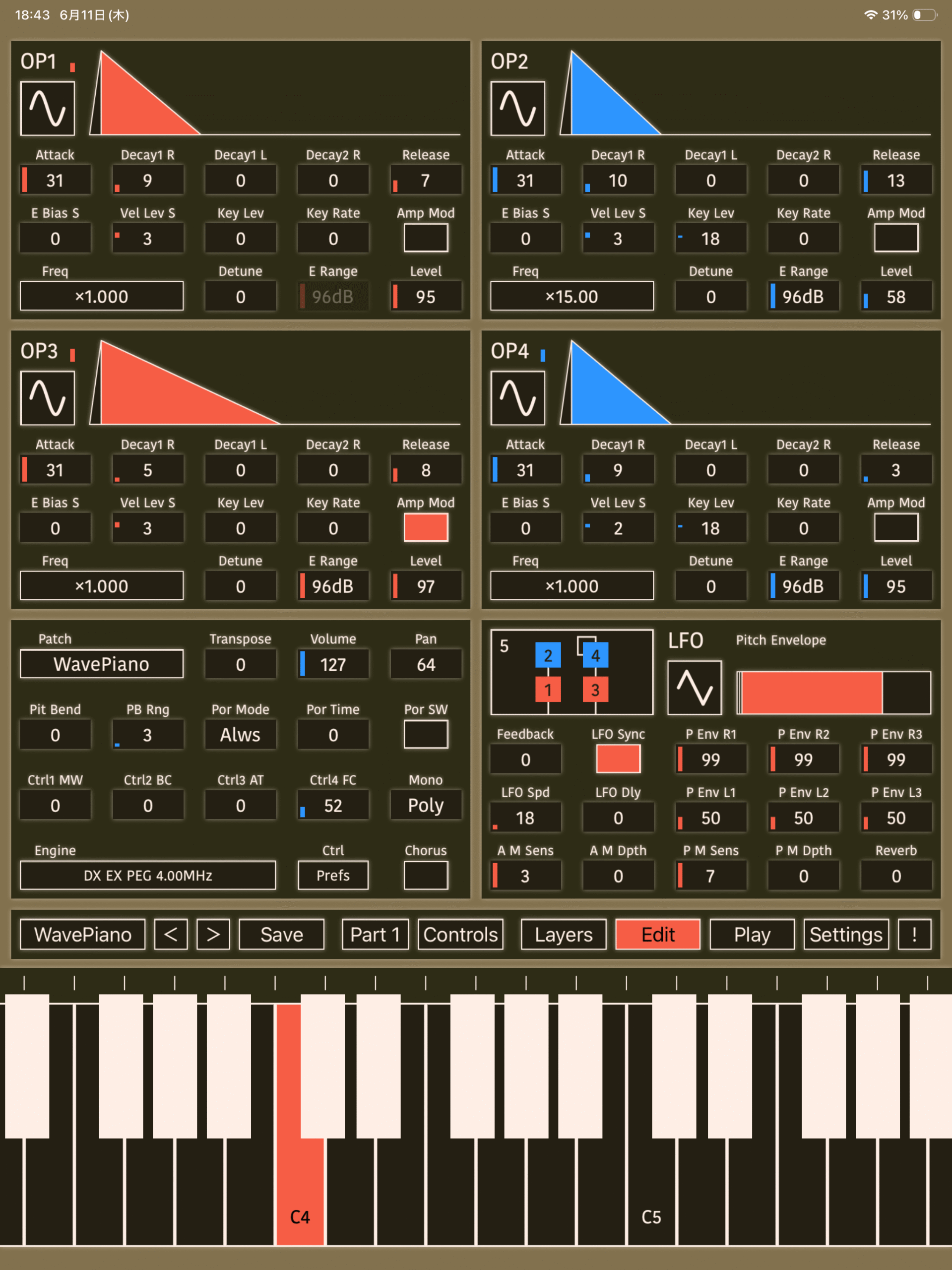
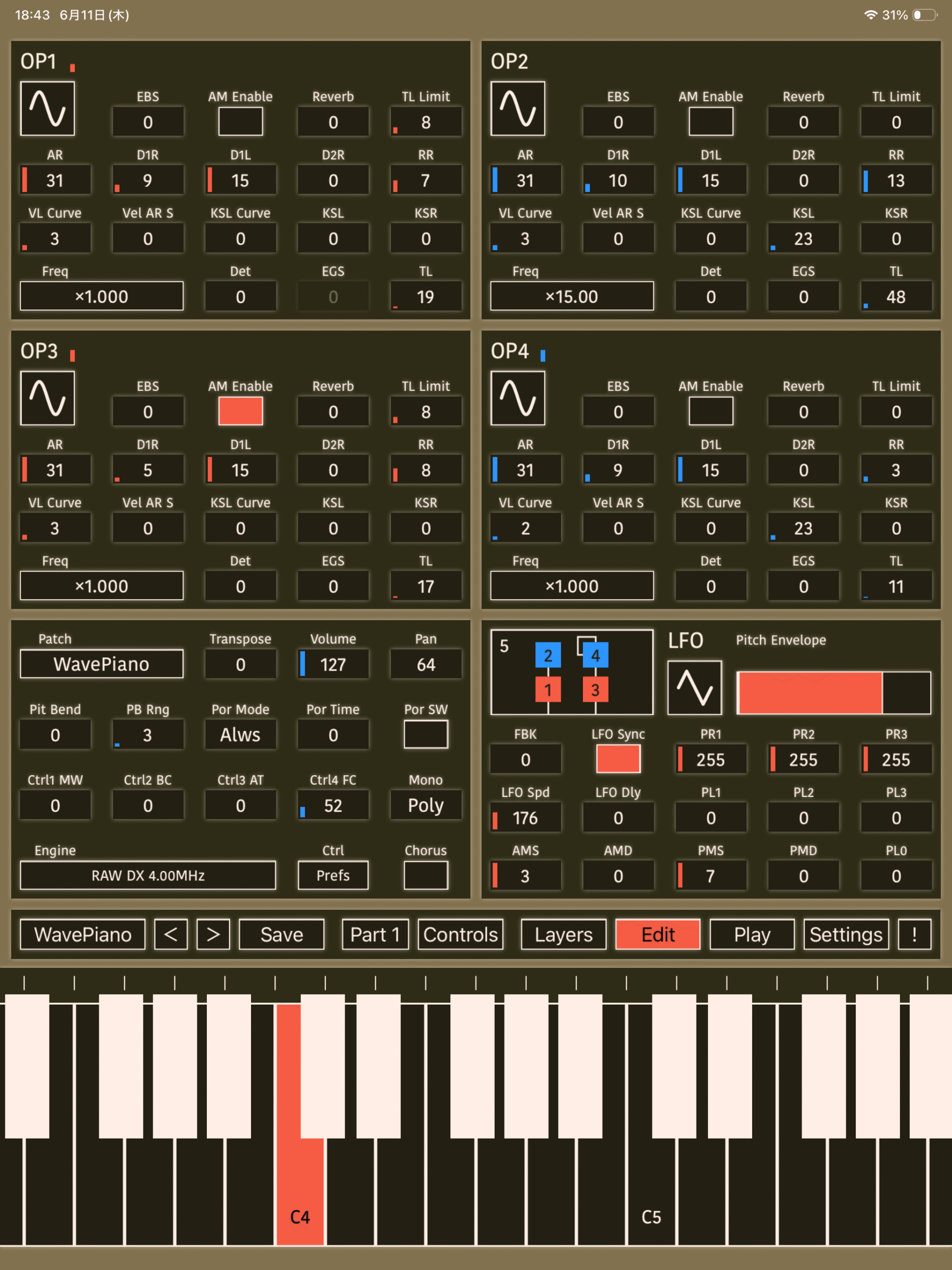
Controllers
KQ Tixie provides seven real-time controllers for modifying sounds.
There are four assignable controllers per voice, plus:
- Timbre (brightness control)
- EG1 (adjusts the envelope speed of OP1 and OP2)
- EG2 (adjusts the envelope speed of OP3 and OP4)
Ctrl 1 MW
Modulation Wheel in DX-series terminology.
Ctrl 2 BC
Breath Controller in DX-series terminology.
Ctrl 3 AT
Aftertouch in DX-series terminology.
Ctrl 4 FT
Foot Controller in DX-series terminology.
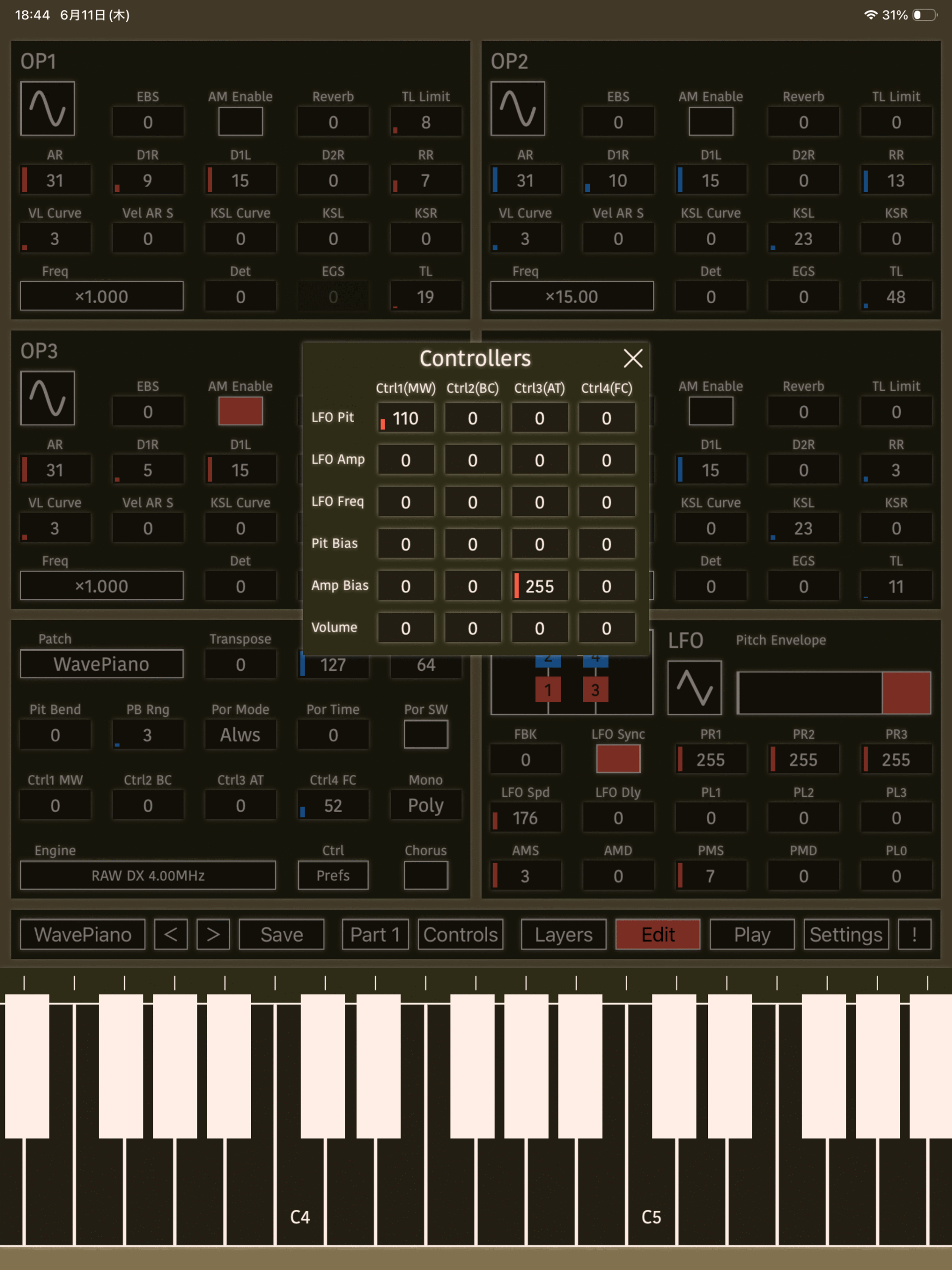
When a voice uses Raw mode, these four controllers can be assigned to the following parameters.
Some assignments are unavailable in non-Raw modes.
Tap Ctrl/Prefs in the voice Edit screen to open the assignment editor.
LFO Pit
Depth of LFO pitch modulation.
Affected by P M Sens. No effect when P M Sens is 0.
LFO Amp
Depth of LFO amplitude modulation.
For carrier operators, this affects volume. For modulator operators, it affects timbre.
Affected by A M Sens and Amp Mod Enable. No effect when A M Sens is 0 or Amp Mod Enable is disabled.
LFO Freq
Adjusts LFO speed.
Pit Bias
Adjusts pitch.
Amp Bias
Adjusts operator amplitude level.
Affected by EG Bias S. No effect when EG Bias S is 0.
Volume
Adjusts volume.
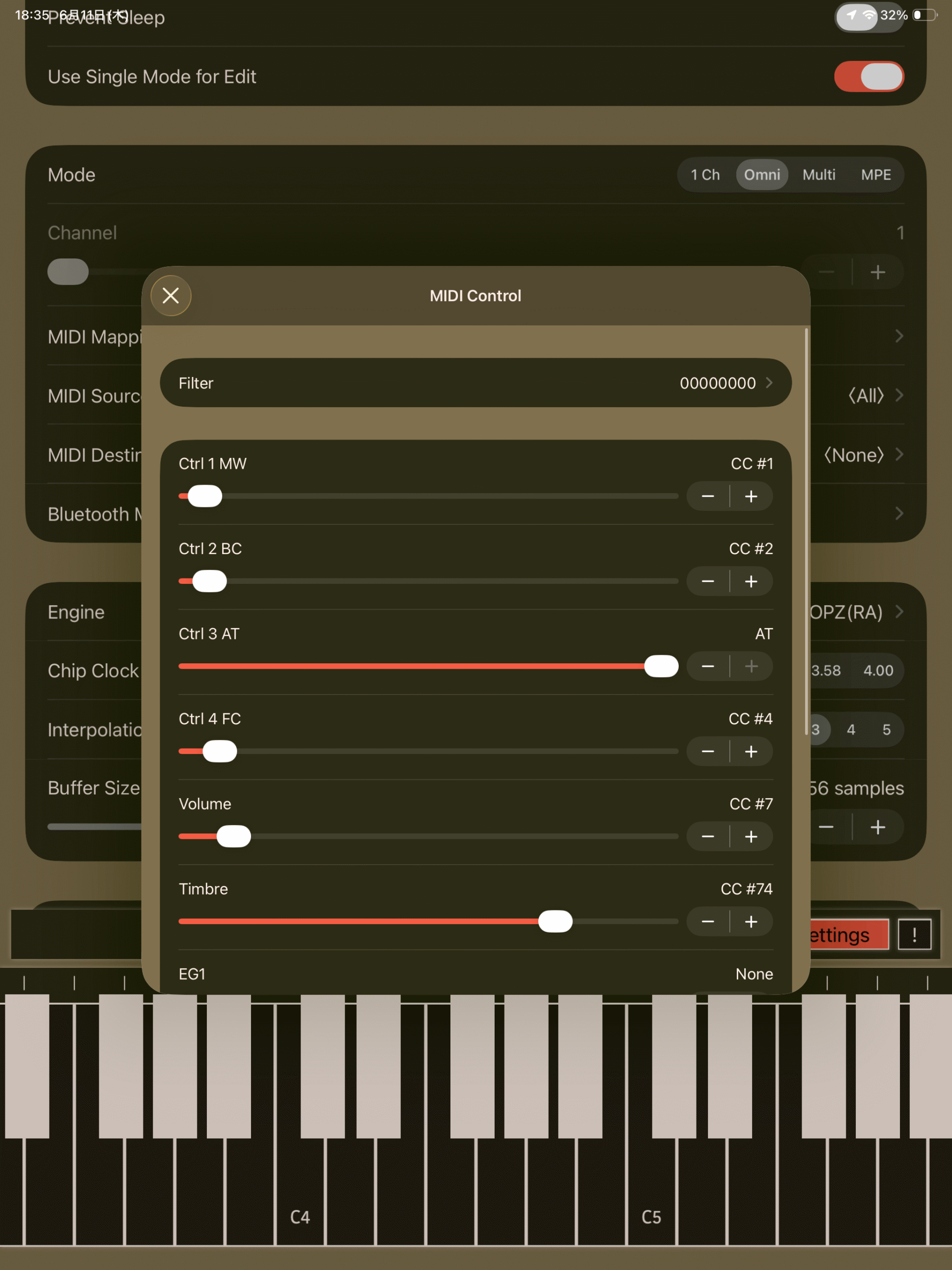
MIDI Control
Four MIDI receive modes are available.
1 Ch
Receives messages only on the specified channel.
Layer-specific MIDI channel settings are ignored.
Omni
Receives messages on all channels.
Layer-specific MIDI channel settings are ignored.
Multi
Receives messages on the MIDI channel specified for each layer.
MPE
Receives MPE-compatible MIDI messages.
Layer-specific MIDI channel settings are ignored.
MIDI Mapping
Select Settings > MIDI Mapping to open the MIDI Mapping screen.
Filter
Select which MIDI message types should be ignored.
Messages specified in Extra MIDI Mapping are still received regardless of these settings.
- Notes
- Ctrl 1 MW
- Ctrl 2 BC
- Ctrl 3 AT
- Ctrl 5 FC
- Pitchbend
- Program Change
- RPN
- Volume
- Pan
- Sustain Pedal
- Portamento
- Timbre Control
- EG1 Control
- EG2 Control
Parameters
Specifies the MIDI CC number to receive.
- Ctrl 1 Mod
- Ctrl 2 Brt
- Ctrl 3 Aft
- Ctrl 4 Foot
- Volume
- EG1
- EG2
Available values:
- None
- CC#0–CC#95
- AT
Receiving the specified message updates the corresponding parameter.
MIDI Mapping
Extra MIDI mappings.
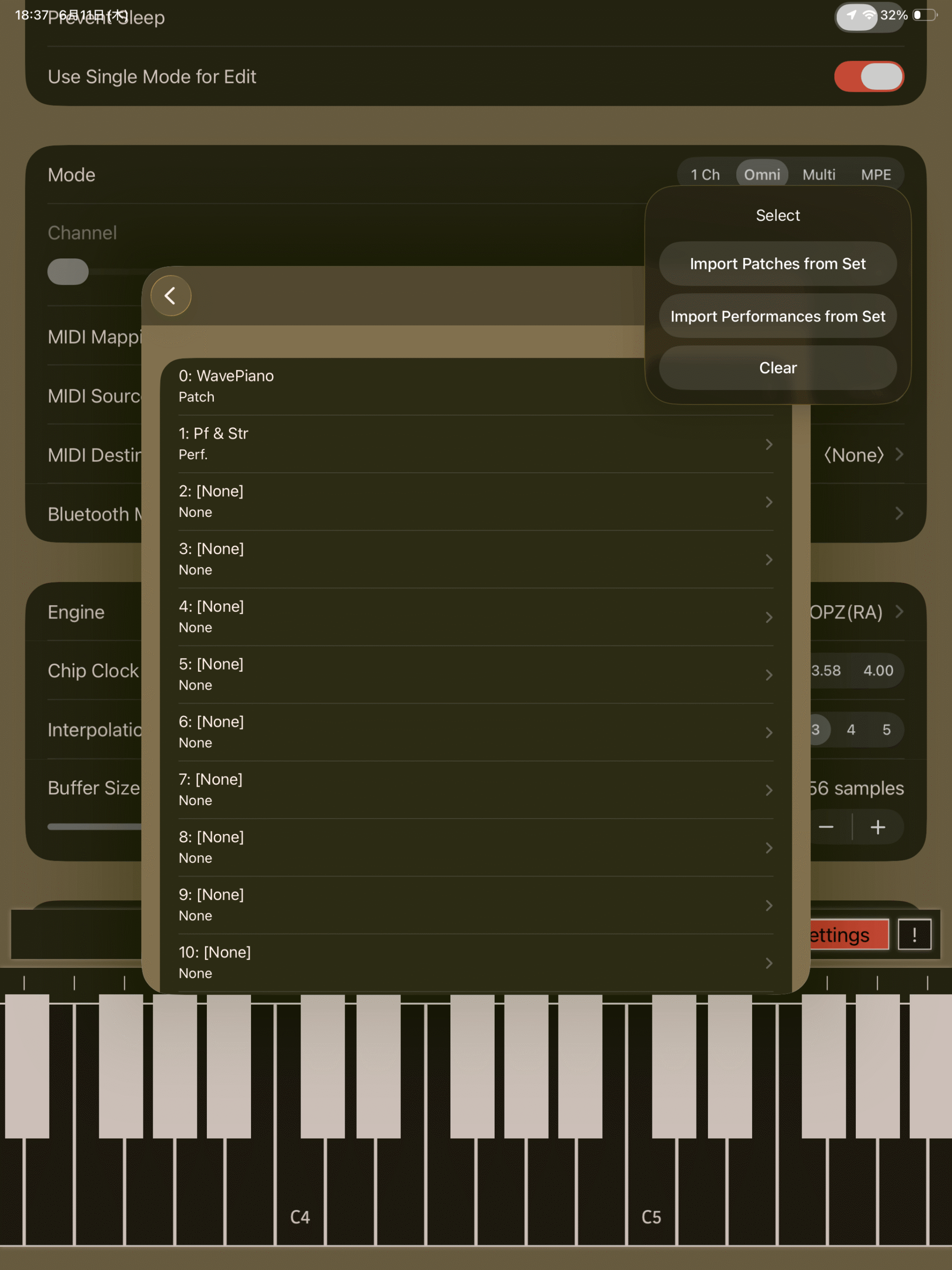
Program Mapping
Program Change mappings.
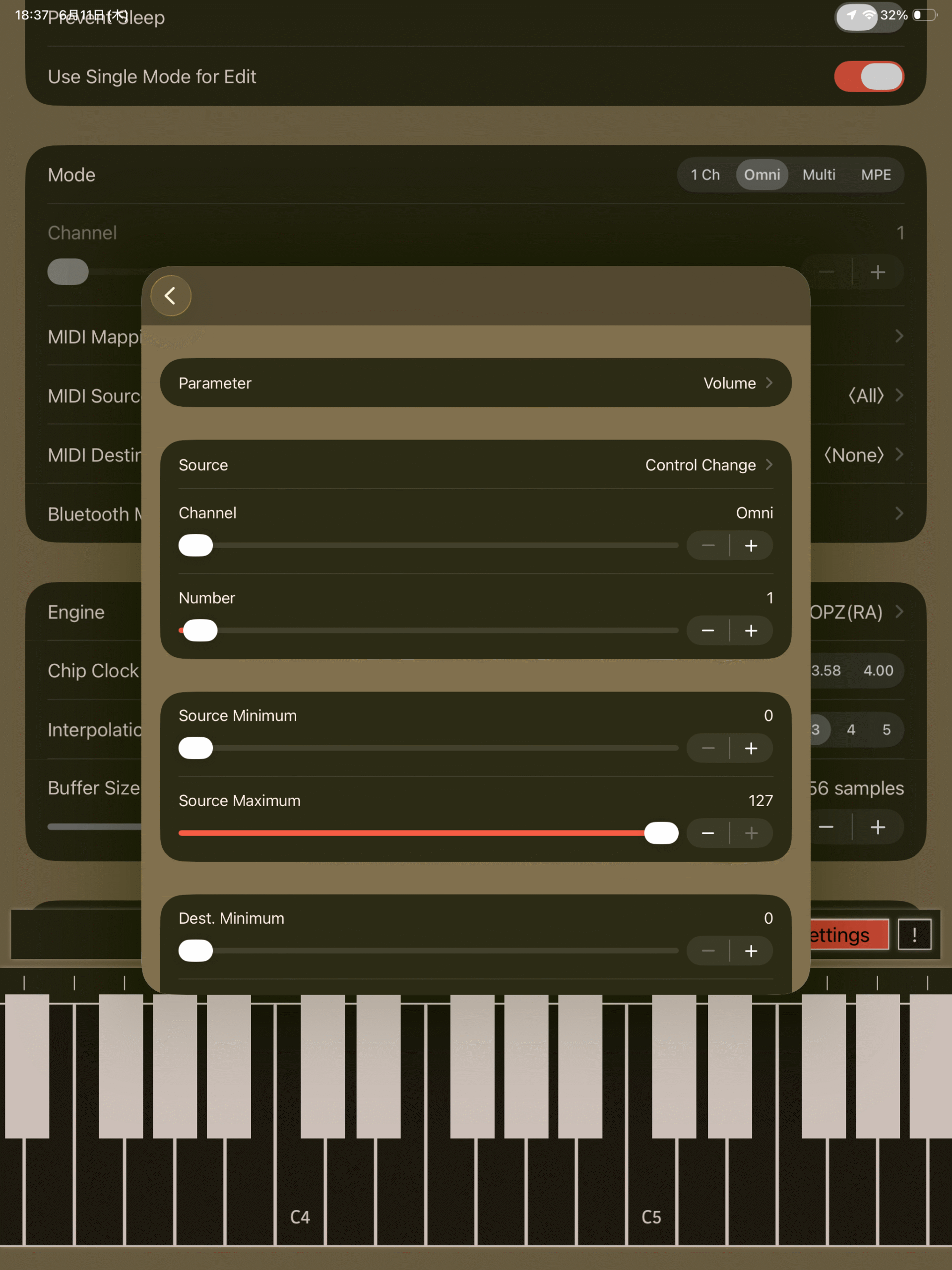
Extra MIDI Mapping
Initially, Size: 0, meaning no mappings exist.
Press + to add a mapping.
Use Edit → Delete to remove mappings.
Parameter
Selects the target parameter.
Source
Selects the incoming MIDI message type.
- None
- Control Change
- Aftertouch
- Pitchbend
- Program Change
- NRPN
- Note On
- Note Off
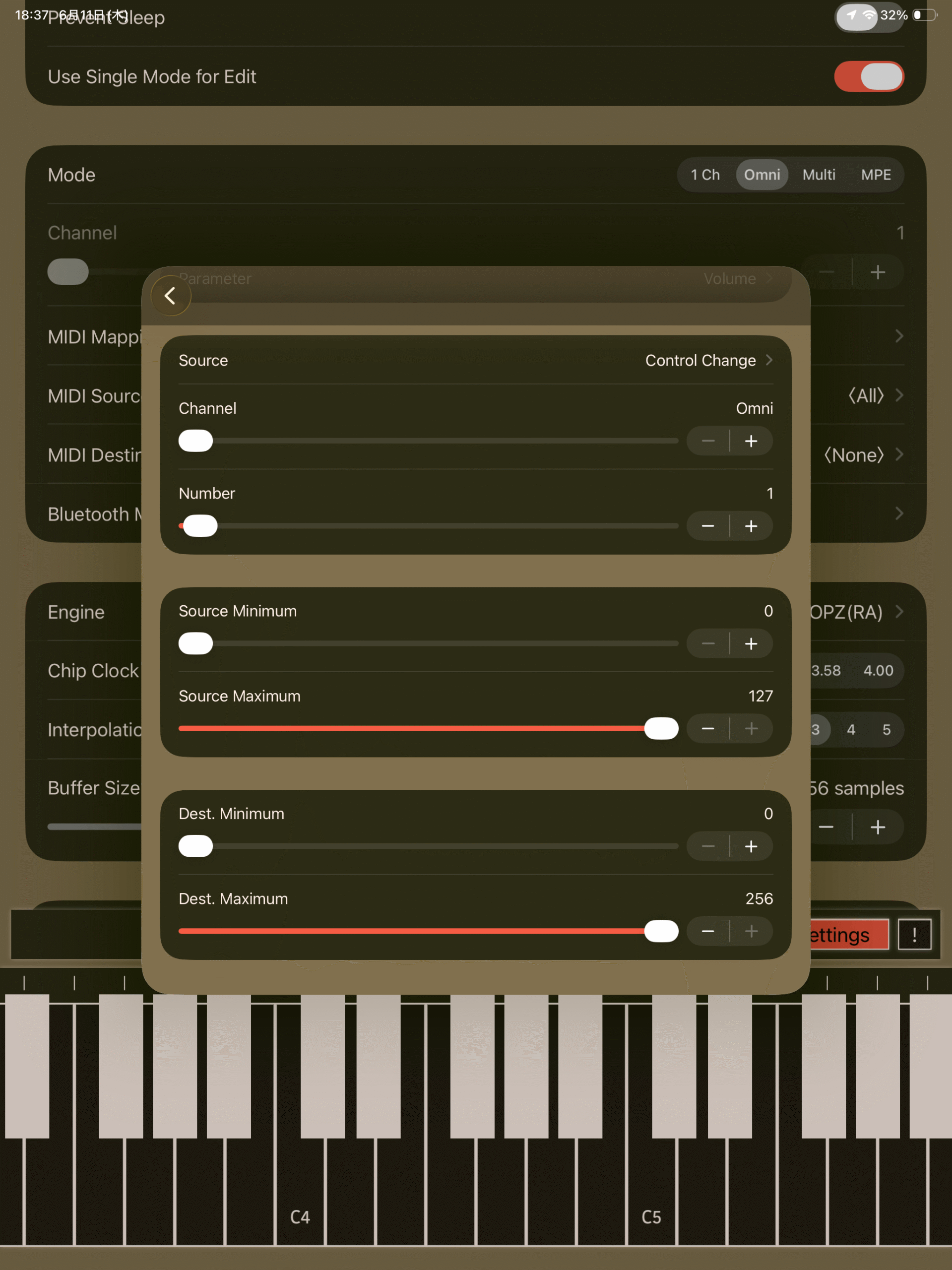
Additional options such as channel and controller number become available depending on the selected source type.
Source Minimum, Maximum
Defines the input value range.
Dest. Minimum, Maximum
Defines the target parameter value range.
The value corresponding to Source Minimum maps to Dest. Minimum.
Dest. Maximum may be lower than Dest. Minimum.
Program Mapping
All entries are set to None by default.
Set the Current Patch
Assigns the current layer’s voice.
Set the Current Perf.
Assigns the current performance.
Import Patches/Performances from Set
Updates the list from saved voice sets and performance sets.
Patch Management
KQ Tixie stores Patches and Performances (collectively referred to as patches in this section) in its built-in library. Each patch can have multiple tags, making it easier to organize your collection. When iCloud synchronization is enabled in Settings, patches are synchronized across your devices via iCloud. However, the library files cannot be edited directly by the user.
The library uses a hierarchical folder structure, allowing folders to contain subfolders.
User-created patches are stored under the File folder. Deleting a patch from File permanently removes it from the library.
Tags also support a hierarchical structure by separating levels with /. When entering tags, you can specify multiple tags at once by separating them with commas (,).
Save Screen
Use this screen to save a Patch or Performance. It can be opened by tapping the Save button at the bottom of the Layers or Edit screen.
Name
Enter the name.
Tags
Assign tags to help organize your patches. Multiple tags can be entered by separating them with commas (,).
Folder
Select the destination folder.
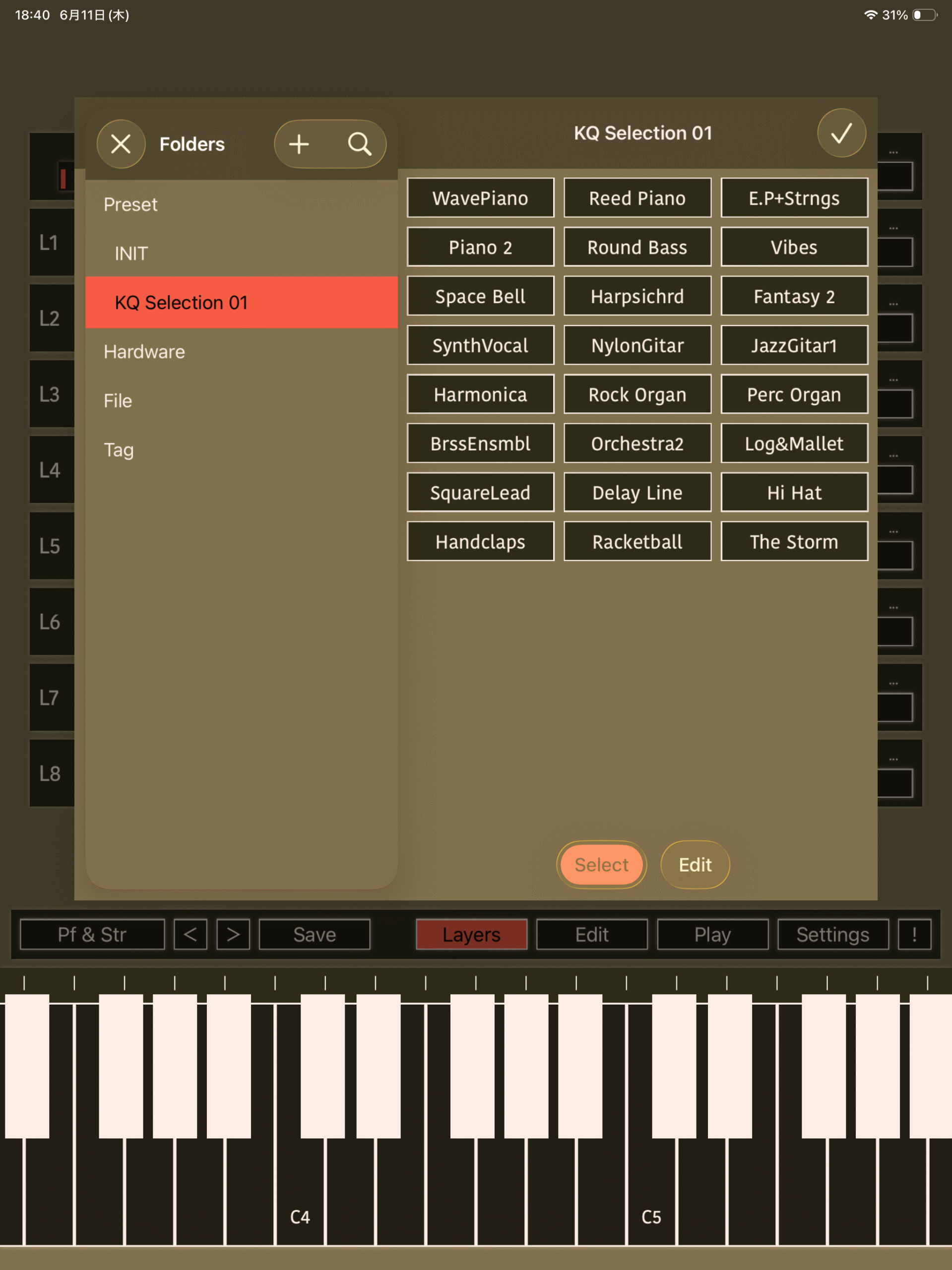
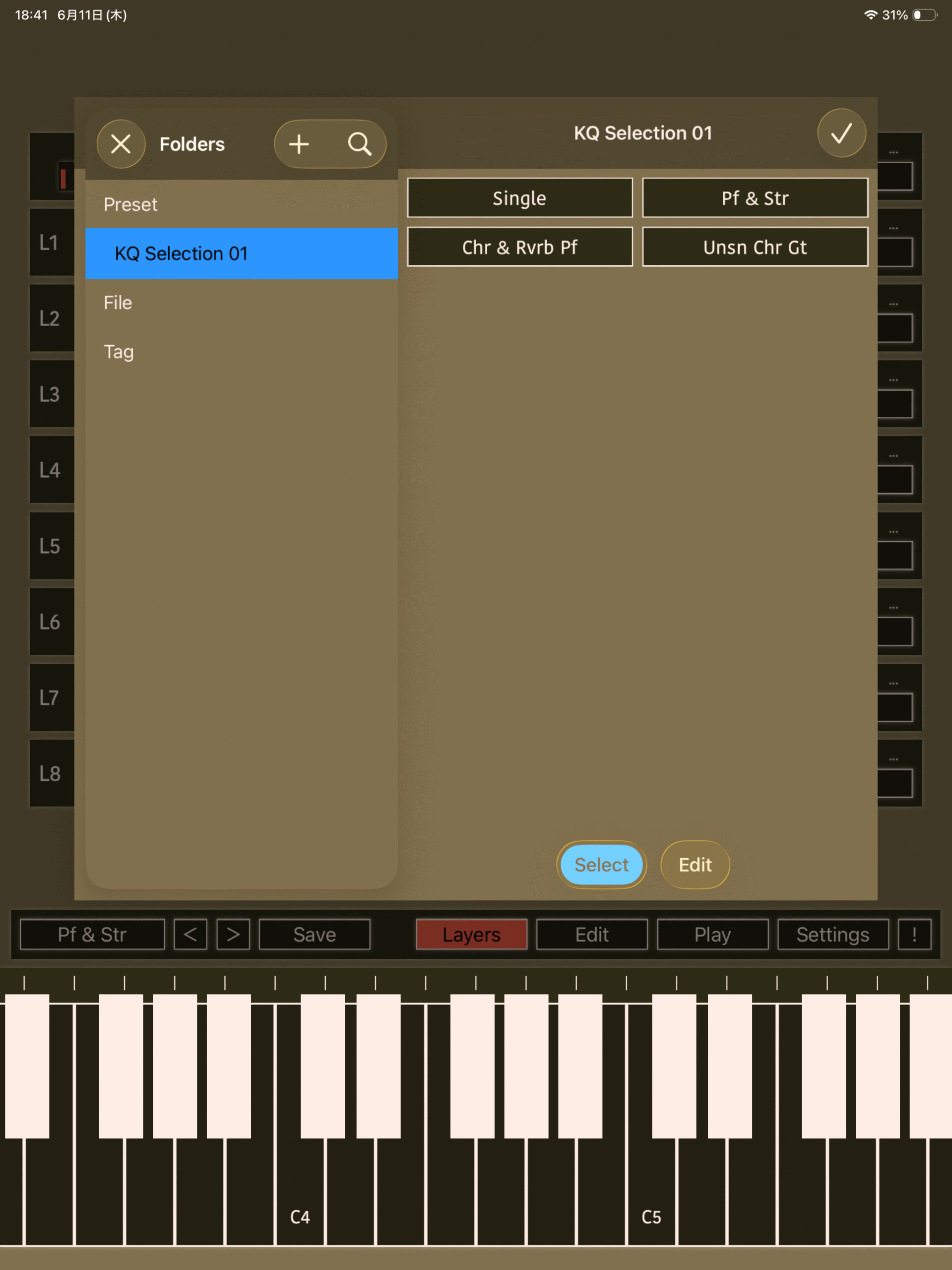
Patch Management Screen
KQ Tixie provides separate management screens for Patches and Performances. Their operation is identical.
Patches / Performances Pane (Right)
Five modes are available.
Select
Selects a Patch or Performance. Tapping an item loads it into KQ Tixie.
Long-press an item to display the following options:
- Copy
- Rename
- Edit Tags
You can also switch to Edit, Overwrite, or Append mode.
Edit
Use this mode to modify library contents.
Tapping an item displays the following options:
- Copy
- Move
- Edit Tags
- Rename
- Delete
You can also reorder items by dragging them.
After making changes, tap Done to apply them, or Cancel to discard them.
You can switch to Multiple mode.
Multiple
Allows multiple items to be selected.
Tap items to select them, then choose an operation from Command.
Available commands:
- Select All
- Copy
- Move
- Delete
- Add Tags
- Remove Tags
Add Tags
Adds the specified tags to all selected items.
Remove Tags
Removes the specified tags from all selected items.
Append
Adds the Patch or Performance currently loaded in KQ Tixie to the selected collection.
Items can also be reordered by dragging them.
Tap Done to apply the changes.
Overwrite
Replaces the selected item with the Patch or Performance currently loaded in KQ Tixie.
Tap Done to apply the changes.
Folder Pane (Left)
Select a folder.
There are four folder categories:
- Preset
Contains the built-in Patches and Performances. - Hardware
Contains Patches automatically recognized during import based on the detected hardware. - File
Contains user-saved Patches and Performances. - Tag
Organizes Patches and Performances by their assigned tags.
Long-press a folder to display the following operations.
Rename
Renames the folder.
Copy…
Copies the folder into another folder.
Move…
Moves the folder into another folder.
Delete
Deletes the folder.
Settings
Master Tune
Sets the global tuning reference.
Default: 440 Hz
Tuning Table
Selects the tuning table. Micro-tuning (all keys) / Scale-tuning.
By default, all notes use Equal Temperament, but the table can be edited.
Middle A Label
Select how middle A is labeled.
- A3
- A4
- A5
Theme
Changes the application’s color theme.
UI Style
Selects either a light or dark appearance.
- Light
- Dark
Zoom Scale
Adjusts the UI scaling factor.
Change App Icon
Changes the app icon to match the currently selected theme color.
Show Software Keyboard
Shows or hides the on-screen keyboard.
Key Touch
Specifies how the software keyboard responds to touch pressure.
Synchronize Patches via iCloud
Synchronizes voice sets and performance sets using iCloud.
When enabling synchronization, you can choose whether to:
- Copy data from iCloud to local storage
- Copy local data to iCloud
Background Audio
Keeps audio active while the app is in the background.
Prevent Sleep
Prevents the device from entering sleep mode automatically.
Use Single Mode for Edit
When enabled, entering the Edit screen automatically switches to Single Mode.
Layer functionality is disabled in Single Mode.
MIDI Source
Selects MIDI input devices.
MIDI Destination
Selects MIDI output devices.
If you own a 4-operator DX-series synthesizer or an FB-01, voice data can be transmitted directly to the hardware.
Connect the device through a MIDI interface and configure it here.
The FB-01 and TX81Z also support requesting dumps of their internal voices.
Bluetooth MIDI
Opens the Bluetooth MIDI connection screen.
Engine
HD is KQ Tixie’s proprietary 24-bit FM engine.
Rapid Attack provides behavior similar to the OPZ FM chip.
Chip Clock
Specifies the emulated chip clock frequency.
3.2 MHz
Used in later DX-series models.
3.58 MHz
Used in earlier DX-series models.
4.0 MHz
Used in the FB-01.
Interpolation
Selects the resampling interpolation algorithm.
A value of 0 disables interpolation and results in very poor audio quality.
Buffer Size
Specifies the audio buffer size.
Increase this value if audio drops out or crackles.
Smaller values provide lower latency.
Import Patches / Performances
Imports voices / performances.
Supported file formats:
- .syx
- .mid
- .zip
- KQ Tixie format
To import from files:
- Select the desired options.
- Tap Import Files.
- Select the files.
- Tap the checkmark button in the upper-right corner.
Voice / performance data can also be imported from received SysEx messages.
Keep Structure
When enabled, voices / performances are imported while preserving the original folder structure.
When disabled, imported voices / performances are sorted alphabetically by name, and duplicate data are removed.
Restore Both
Restores a backup previously created using Export.
Export Patches/Performances
Exports saved voice sets and performance sets. A file is exported in the KQ Tixie original formats.
Save as AUv3 Default
Saves the current state as the default configuration when KQ Tixie is opened as an Audio Unit (AUv3).
About Audio Units
KQ Tixie provides two Audio Unit variants:
- ExParam, which exposes all available parameters.
- Standard, which omits some parameters.
During testing with GarageBand, we found that exposing all parameters may cause GarageBand to freeze. If you are using GarageBand, please use the Standard Audio Unit instead.